September 2026 · sharing links, pre-production reports and more export formats
September brings Share: a link or QR code for a client to open the model in 3D and AR, including over local Wi-Fi. It also adds PDF pre-production reports and more export formats.
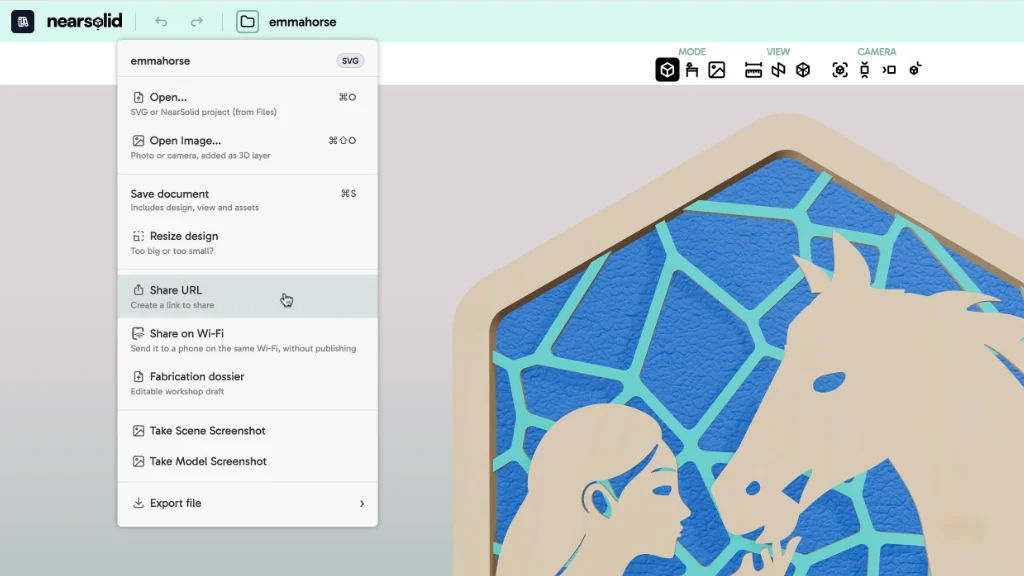
This month we added Share. Create a link and the person receiving it can open the model in 3D — and in AR on a compatible phone. They do not need to install anything or know how to use the editor.
Share
- Before publishing, you can set the title, description, author and client.
- Choose the background, show or hide rulers, and decide whether to offer AR.
- NearSolid generates a QR code so the link can be opened on a phone in a meeting, on site or where the design will be installed.
If your computer and phone are on the same Wi-Fi network, you can also open a local review in AR without uploading the project to the cloud.
PDF pre-production report
NearSolid uses the model’s layers to create a review sheet with previews, without requiring you to prepare a separate sheet for every element.
- Choose which layers appear and add a title, description and workshop notes to each one.
- Complete author and client details, include the date, and generate a model render or exploded view.
- If you have already published a presentation, the report includes its QR code.
If the design is already well structured in CorelDRAW, for example, you can present the 3D mock-up and use NearSolid to generate a PDF report with layer details, notes, 3D views and a QR code to send to your client. It saves the time usually spent describing a project in a design-only document.
The report is for reviewing the proposal before preparing manufacturing files.
More export formats
- Editable SVG, to continue working in Illustrator, CorelDRAW or Inkscape.
- 2D DXF, for cutting.
- GLB, USDZ and 3MF, for 3D presentation, AR or manufacturing.
The project saves more context
The .nsolid file now also stores the Photomatch photograph and settings, shared-presentation configuration and pre-production report details. When you return to a project days later, everything is where you left it.